Workkflow (git)
2026-09-08
First published: 2026-09-04
Git workflow
This is the workflow I normally prefer to use for all my projects. It’s also known as the OneFlow model. In general, I find it better suited to my working style. There is, of course, no right or wrong choice here – you use what suits your working style best.
How it works
The model uses one eternal branch – usually
master – in newer repositories, this is usually
main. This branch must be kept in pristine state –
i.e. it is always release-ready. This requires some effort in terms of
maintaining strong test suites that give a high degree of confidence. It
also requires a mature team that agrees on the importance of automated
unit and integration tests, and follows strong test practices.
🛈 A note about testing
In general, the idea of a pristine main branch breaks down without strong test practices within the team. This normally mandates at least one or two gate-keepers, or code-owners who are authoritative pull-request approvers and have over-arching powers over allowing merges into the main branch. The code-owners must be responsible for ensuring test practices are followed and there is sufficient coverage of any changes coming into the main branch.
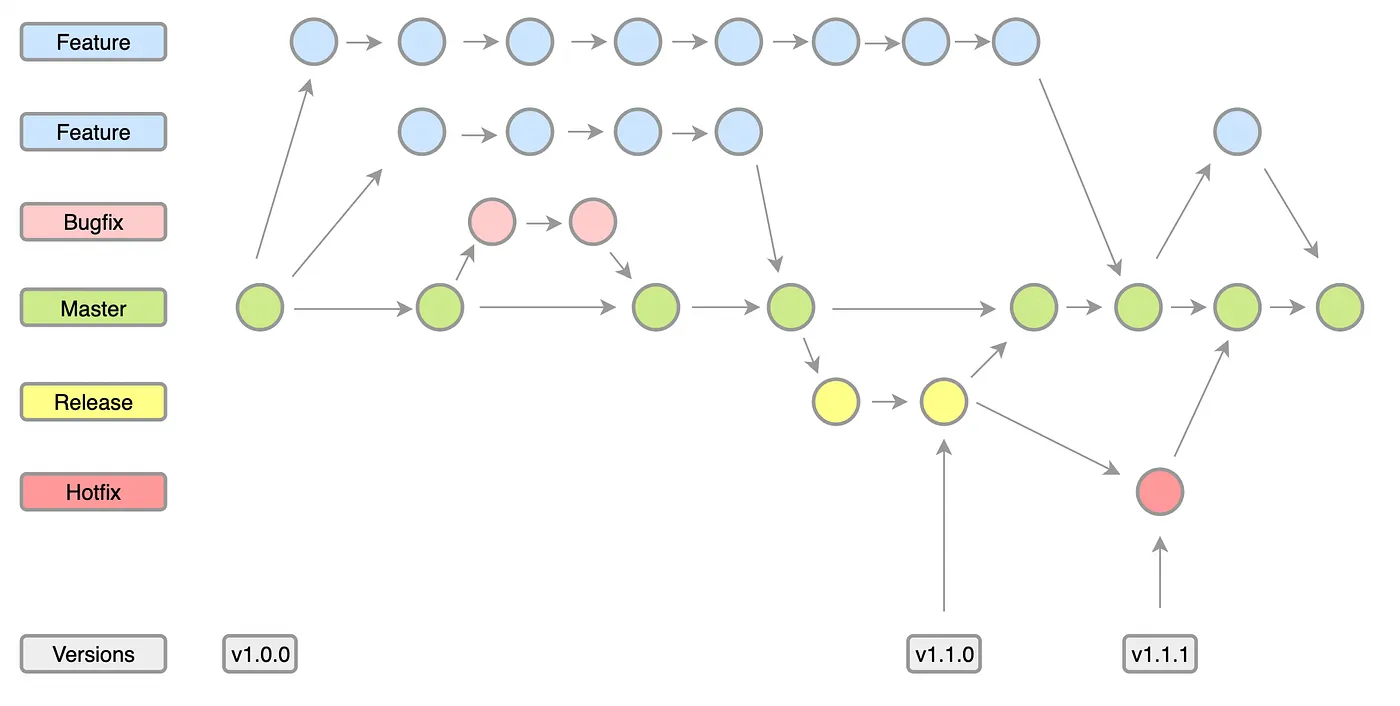
The one variant in my process from the above diagram is that the Bugfix type is allowed to occur either on the main branch or on the release branch. If on a release branch, the Bugfix workflow is similar to the Hotfix workflow. All pull-requests need at least one code-owner approval or they cannot be merged back to the main branch.
The general process always starts from the main branch:
- You create an appropriately named branch – either feature/ or bugfix/ on the main branch.
- All work is done in the branch until it’s ready to merge.
- A pull-request is raised for a code-owner to review/approve the changes. Once approved, the code-owner will also merge this change into the main branch.
- Once merged the main branch can be released, if required. Release constraints depend on the specific project and organisational requirements for a change to be promoted to production.
For a release, then:
- A release branch is created from the main branch.
- A build is produced and deployed to the QA environment.
- As part of the build, the version to be released should have adequate automated test coverage to deliver confidence in the release. This is ensured by the review and approval process for accepting changes into the main branch. Inadequate test coverage will usually be rejected until the minimum confidence level is achieved.
- The QA deployment is mostly to facilitate downstream integrators and users signing-off on features requested or bugs reported.
- If any issues are noted during QA that fail signoff, a bugfix may be applied to the release branch following the bugfix branch and the usual review/approve/merge process.
- Once signed-off, the release can progress into production. Each build on the release branch is tagged with the version number. Patch versions will increment per change and build performed on the release branch, and a tag will be applied with the new version.
Hotfixes are reserved for problems reported on a released build that is already in production.
- For a hotfix, the branch must be taken from the current release branch already in production.
- Any work required to fix will be done on this hotfix branch.
- Once ready, a pull-request will be raised. A code-owner must review and approve, applying the same requirements for acceptance as any change coming into the main branch.
- Once merged into the release branch, a new patch version will be built, tagged with the new version number, and deployed to the QA environment for signoff.
- Once signed off, it can be released to production.
- This change must also be merged back to master. The code-owner will usually merge to both, once the change is accepted.
Closing notes
This process has worked well for me on fairly large projects that have many upstream and downstream users and contributors. It is a tried and tested process, and works very well to ensure the quality of the main branch is not compromised or impacted by a high rate of change, either upstream, or within the project, or downstream clients. Of course, as is usual, just this process cannot, by itself, guarantee quality. It must be accompanied by other best-practices like a strong test culture, a good overall design culture that considers holistic impact of changes at design time, and a strong team ethic focussed on the organisations goals, ensuring the software design and delivery aligns well with these goals.
Whilst having strong code-owners that mandate certain minimum levels of quality for acceptance can create friction, this is well worth it to ensure the software delivery remains strong, the team delivers robust and resilient software designs and features and the business users are given a product they can use in normal and high volatility situations with high confidence of correct behaviour.