Moving email to Fastmail
2026-08-27
First published: 2026-08-25
Why a hosted email service?
Well I guess, one way of being made aware of one’s age is seeing a warning on the GMail app saying you’re about to run out of your 15GB free space. That day arrived a few months ago, and I’ve been clearing out emails I don’t need manually, just to buy some time while I look into options.
The options available are not too many:
- Pay Google for more storage. This is probably the cheapest option!
- Get a new “free”mail (e.g. at Microsoft 365) – and pay for additional storage so the story doesn’t repeat!
- Pay for a hosted email service.
Of the above, paying a BigName™ Cloud provider is the least attractive to me, at the current time. All of them are quite happy using all data available to them as training fodder for their LLMs.
So that brings me to my only, realistically practical option – pay for a hosted email service.
Choosing a hosted email service
Ok – now that we know what we want to do, how does one go about selecting an appropriate hosted email service?
After a little digging around, I quickly narrowed it down to the following choices:
- My DNS provider – I already pay for DNS since I run my own web-site. So, the obvious and easiest integration option would be a hosted email service provided by them. However, this was quickly ruled out by the fact that they only provide company email hosting – not private individual email hosting.
- Proton – this is a full-fat, end-to-end encrypted solution, offering additional bells and whistles like encryption, a secure vault, an online password manager, and an authenticator, over and above the email hosting. Everything is promised to be end-to-end encrypted. And everything is under Swiss law, so strong privacy protection, with the usual governmental caveats. They’re quite honest about this – so that isn’t the real problem.
- Fastmail – this is a fully standards based (IMAP, SMTP, WebDAV) email hosting solution. Encryption is provided by TLS/SMARTLS. So data is encrypted in transit, but not at rest. This is no different from GMail – so not really an issue. It also allows using your own domain, if you have one (which I do!), and offers migration tools to move data over.
So, overall, it would seem that Fastmail offers the least friction migration from GMail. It offers all features that I currently use from GMail (email, calendars and files), as well as offers native integration with OS programs I already use for GMail via standards-based protocols.
🛈 Why I rejected Proton
On the face of it, Proton would appear to be the better choice. If offers end-to-end encryption using PGP for all user data: emails, files, calendars etc. Whatever you store on their servers is encrypted.
However, it’s not clear (to me anyway!) how encrypted emails to other service providers (e.g. from Proton to GMail) would work - maybe they offer symmetric encryption (straight password protected content) for such cases. But clearly, using asymmetric encryption can’t work as the other side would not know how to deal with it.
So, to me, the end-to-end encryption really isn’t end-to-end. It’s really just from the Proton client, to the Proton server, and within the Proton server itself (data in motion to here, and at rest in here). Data exiting Proton to an external provider like GMail cannot possibly work unless the encryption chosen is symmetric, and then of course you need a side-channel to communicate the pasword to the recipient in a secure way, so that they may actually read the email. The alternative is plain text (unencrypted) email on the way out.
Even more problematic, is the fact that Proton does not integrate cleanly with native applications on the OS. You need to install a “bridge” so that your local email client can work with Proton servers and provide a transparent encrypt/decrypt layer. This is an opaque layer sitting in between you and Proton, and manages keys transparently for you. While I have no doubt Proton do what they say, and your private keys do not leave your machine, this is not a model I personally am comfortable with. The whole point of end-to-end encryption has to be that you are in control of op-sec and private keys. And this is not true here.
So ultimately, I came to the conclusion the Proton does not work for me.
Setting it up
Ok, so having decided I am going with Fastmail, the next step was setting up a trial to verify that it actually would work for me.
This is easy - sign up for an account, and you get a no-commitment, 30-day trial. I did that.
Setup is easy. Once you’ve registered for a plan – I chose the family plan – you can proceed to setup other family member email addresses and secure them. Fastmail supports Time-based One-time Passwords - TOTP so I enabled it straight away. A strong password is in use, but if 2FA is available, it should be enabled and used.
Next was DNS setup. This was perhaps the most complicated, however Fastmail makes it as easy as possible. It provides a wizard that walks you through the steps required to enable email routing with your domain name. Just follow the steps and you should be done. Just remember the format for MX records is as shown below.
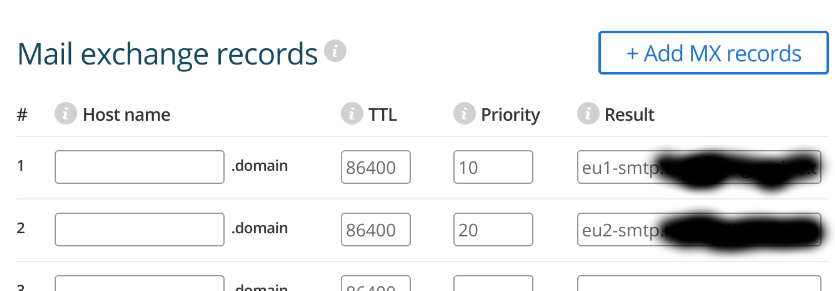
- The Hostname entry should be blank.
- The TTL should be the default value – should
already be set. If not, use
86400 - The Priority should be
10for the first email server, and20for the next. These will be specified by Fastmail in the wizard for DNS setup. - Finally, the Result should be the email servers specified by Fastmail for you – will differ based on where you are geographically located.
Give it some time – it took about 10 minutes for the DNS changes to propagate – and Fastmail should be able to run a test and confirm DNS is ok. You should see this when all is well.

At this point you should be able to send and receive email on your domain. You can test this from your normal account to verify you’re receiving emails.
Migrating stuff
Fastmail provides tools to migrate data from services like GMail. I could use that.
But I decided not to. After all, a clean mail-box is quite hard to find! So now that I have one, do I really want all the rubbish pulled in here? Probably not!
So instead, I decided to leave it clean. This way I can move what I want, and leave what I don’t want. I’m also not going to use this mail box for online stuff – just for important things like Bank accounts, professional work and close friends and family.
That should hopefully keep it clean – and what gets through regardless, can be dealt with, with Fastmail filters.
So what did I migrate?
Turns out IMAP makes migrating selected data really easy on a local client! All one has to do is get connected to Fastmail via IMAP. This turns out to be trivially easy in Gnome Online-accounts. You just need to create a couple of app-passwords.
App passwords
I needed two app-passwords:
- For email/calendar – this does not work directly for WebDAV, so another app-password is required for file sharing. This sets up your email client with email, calendar and contacts.
- For WebDAV – this needs a separate setup in Gnome Online-accounts and therefore the separate app-password. This sets up your Files browser with a shared filer on Fastmail
Obviously all are empty. But once these are visible on your local client, you can simply drag and drop from your current email service folders into the Fastmail folders (or individual emails, or copy contacts over).
This way turned out to be much better (for me!) than using the Fastmail import tool, and results in a cleaner mailbox.
Closing thoughts
So with this, I have everything I care about working on Fastmail, some data has already been moved over, the rest will follow over time, as needs dictate. I’m reasonably happy with the state of things, and much relieved that the impending Google issue of running out of free email space, is no longer a problem.
Above all, I’m very pleased with getting email addresses for my family setup at our family domain. This was a long-standing wish that has finally become reality.
Is it more expensive than Google? Most certainly. But it has the benefit of not being in the LLM trawl domain. That alone makes the extra cost well worth it. All the features that I want working, actually working? Well that’s just icing on top of an already delicious cake!